Home Office Design Ideas: A Practical Guide to a Workspace That Works
Research-based home office design ideas covering ergonomics, lighting, layout, acoustics, and decor, so your workspace supports focus, comfort, and long days…
Georgia Home Design
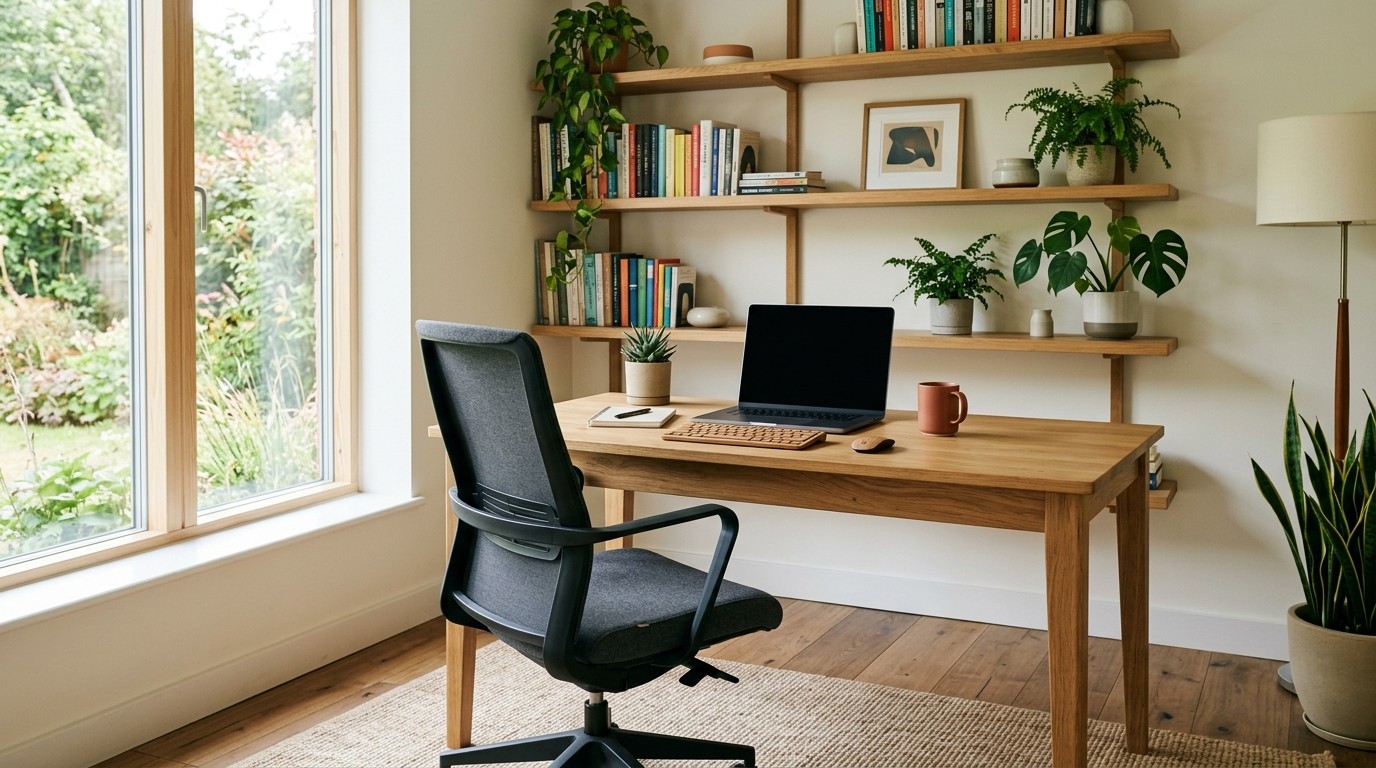
A home office is rarely a temporary setup anymore. For a growing number of Canadian households, it’s a full-time workspace, the room where proposals get finished, clients get called, and eight-hour days actually happen. The difference between a space that leaves you stiff and distracted and one that quietly helps you focus usually comes down to decisions made before any furniture arrives: where the desk sits, how the light falls, how the room sounds, and whether your body can settle into a comfortable position and stay there.
As an Amazon Associate we may earn a commission from qualifying purchases made through links on this page, at no extra cost to you.
This is a research-based guide, not a hands-on product review. It draws on ergonomic standards, lighting guidance, and interior-design principles (not lab testing) so you can plan a workspace that’s comfortable today and still functional a few years from now. Where a claim rests on a source, it’s linked directly. The shorter focus-first version of the same room is home office design that actually helps you focus.
Start with ergonomics, not aesthetics
It’s tempting to begin with the desk you saw online. Resist that for a moment. The most important question is whether the room can support a neutral posture: shoulders relaxed, elbows close to the body at roughly a 90-degree angle, wrists straight, and feet flat on the floor or on a footrest. The U.S. Occupational Safety and Health Administration’s computer workstations guidance and Cornell University’s Human Factors and Ergonomics research group both frame this neutral posture as the foundation of any screen-based setup.
From there, a few practical rules follow:
- Desk height should sit around elbow height when you’re seated, so your forearms are roughly parallel to the floor. If you can’t change the desk height, an adjustable chair and a footrest do the work instead.
- Monitor placement matters as much as the chair. The top of the screen should sit at or slightly below eye level, about an arm’s length away, close enough to read without leaning in, far enough that your eyes can relax.
- The chair should support the lower back’s natural curve. Lumbar support, adjustable seat height, and a seat depth that leaves a small gap behind your knees are the features worth prioritizing over appearance.
Read that as a sequence: get the body right first, then choose furniture that fits it.
Layer your lighting
Bad lighting is the single most common home-office mistake, and it tends to show up as afternoon headaches and a screen you can’t stop squinting at. The goal is layered light (ambient, task, and a little accent) rather than a single ceiling fixture trying to do everything poorly. The room-by-room version of that stack is in the home lighting design guide.
Start with natural light, ideally coming from the side rather than directly in front of or behind your monitor, which creates glare. A desk positioned perpendicular to a window is a reliable default, and sheer blinds or a roller shade let you tame midday sun without losing the daylight entirely.
For task lighting, a desk lamp with an adjustable arm and a diffused shade lets you aim light at paperwork without bouncing it off the screen. Lighting-design guidance (the kind referenced by the WELL Building Standard) commonly points to roughly 300 to 500 lux for general office task work. (Lux describes how much light actually reaches a surface; brighter isn’t automatically better, because glare and harsh contrast cause as much strain as dimness.)
Finally, think about colour temperature. Many modern LED desk lamps let you shift between warm and cool white; cooler light during working hours and warmer light toward evening more closely matches the daylight cycle your body expects. The WELL standard treats this circadian dimension as a deliberate part of healthy lighting rather than an afterthought.
Plan the layout before buying anything
Layout is where most home offices succeed or fail, and it’s the cheapest thing to fix because you can do it on paper. Sketch the room to scale first (including doors, windows, and any furniture that has to stay) before committing to a desk size.
A few principles hold up across almost any room:
- Separate work from rest where possible. Even a partial visual divider (a bookshelf, a curtain, a change in rug) helps the brain switch off at the end of the day. If you’re tight on room, our small space design tips cover zoning tricks for shared spaces.
- Think about traffic. You shouldn’t have to dodge a chair to cross the room, and cables shouldn’t trail across a walkway.
- Face something worth looking at. Facing a wall minimizes distraction; facing a window offers your eyes a rest between tasks. Try to avoid facing directly into a hallway.
If the office also has to be a guest room or den, design the desk so it can be “closed” at night, a fold-down surface or a screen that hides the monitor when the workday ends.
Choose colour and materials deliberately
A workspace doesn’t need to feel sterile, but it shouldn’t compete for your attention either. Matte, mid-tone walls (soft greens, warm greys, muted blues, or putty) read as calm and tend to age better than trend-driven brights. Lighter colours still help a small room feel larger, which matters when the office shares space with a bed or sofa.
On surfaces, prioritize durability and cleanability over novelty. A desk should wipe down easily, and a hard-wearing, low-sheen finish reduces glare from your lamp and window. Avoid high-gloss desktops, which reflect the screen back at you. Rugs do double duty here: they define the work zone visually and absorb sound, which leads neatly into the next point.
Control sound and distraction
Background noise is the silent productivity killer, and most homes weren’t built with quiet work in mind. Hard floors, bare walls, and hollow-core doors let sound bounce around. The fixes are mostly soft: a rug under the desk, upholstered seating, curtains instead of blinds, and (if the room is echoey) a few acoustic panels on the wall nearest the sound source. Acoustic comfort is treated as its own design concern in the WELL standard, not merely a finishing touch.
Door choice matters more than people expect. A solid-core door blocks noticeably more sound than a hollow one, and a door sweep seals the gap underneath where a lot of noise leaks through. If you can’t change the door, a heavy curtain drawn across the opening is a reasonable interim fix. And if you share the home, a simple “in a meeting” signal (even just a small light) sets expectations without a raised voice.
Bring in nature
Plants, natural materials, and a clear sightline to a window or greenery are the elements of “biophilic design,” and the WELL standard includes a connection to nature as part of its broader approach to occupant wellbeing. The honest version is that a few well-chosen plants make a workspace feel less clinical and more like a room you actually want to spend time in, and there’s reasonable evidence linking natural elements to lower stress and steadier focus.
What plants won’t do is meaningfully purify your air. The popular idea that a couple of houseplants scrub toxins from a room overstates the science; reviews of indoor-air research consistently find that ventilation, not greenery, does the heavy lifting in a real room. Treat plants as a mood and aesthetic feature (choose low-maintenance species suited to your light) and rely on fresh air and a decent desk fan for the rest.
Tame the cables and clutter
Visual clutter is a slow drain on concentration, and nothing clutters a desk like a tangle of cables. Before the setup is finished, plan where power will come from: a floor outlet, a power strip mounted under the desk, or a cable-management tray that keeps the strip off the floor. Adhesive cable channels along the desk legs keep cords bundled and out of sight.
Give paperwork and supplies a closed home (a drawer unit, a small cabinet, or a few baskets on a shelf) so the desktop stays clear except for what you’re actively using. A clear surface isn’t just tidier; it genuinely changes how the room feels to work in.
Personalize, within limits
A workspace that feels like yours is easier to sit down in. The trick is restraint. One or two meaningful objects (a piece of art, a framed photo, an object from a trip) give a room personality without becoming visual noise, and rotating them occasionally keeps it fresh. The same goes for notes and to-do lists: a single, dedicated board or strip of wall is far more useful than sticky notes scattered across every surface.
Ideas for specific spaces
Most home offices aren’t purpose-built rooms, so the design has to bend around what’s available:
- A bedroom corner. A narrow desk against the wall, a wall-mounted lamp, and a chair that doesn’t read as “office” keep the room feeling like a bedroom first.
- A closet office (a “cloffice”). Remove the doors, add a desk span and task lighting, and you have a workspace that disappears at night. Great for focus, less ideal for video calls, check your backdrop.
- A basement. Basements are quiet but often short on natural light and long on echo. Spend your budget on layered lighting and sound absorption first. If the room itself needs construction, home office renovation ideas covers conversions, closet offices, and sound isolation.
- A living-room nook. A consistent material palette (the same wood tone as nearby furniture, for instance) helps a desk feel like it belongs rather than landing like an alien object. Our small space living room design ideas go deeper on integrating a work zone into a shared space.
A short, honest shopping list
Because this is analysis rather than hands-on testing, the recommendations below point to categories worth comparing (not specific models) with links to Amazon so you can read current reviews and check prices for yourself. Every link carries our affiliate tag.
Listing check (ergonomic chair): confirm the seat-height range reaches your desk, and that lumbar support is built into the frame, not a clip-on pillow sold as an add-on on the same search result.
- An adjustable ergonomic chair with lumbar support, the highest-leverage purchase in any office. (browse chairs)
- A standing desk converter, if you want to sit and stand without replacing the desk. (browse converters)
- A monitor arm, to lift the screen to the right height and reclaim desk depth. (browse monitor arms)
- An LED desk lamp with adjustable colour temperature, for layered task lighting. (browse desk lamps)
- A few acoustic panels if the room is echoey. (browse acoustic panels)
A quick home office checklist
- Work surface at about elbow height; forearms parallel to the floor.
- Monitor an arm’s length away, top at or just below eye level.
- Chair with lower-back support and adjustable height.
- Layered lighting: daylight from the side, a task lamp, modest ambient light.
- A layout that separates work from rest and keeps walkways clear.
- Soft surfaces (rug, curtains, panels) to control echo.
- A closed home for supplies and a cable plan that keeps cords hidden.
- One or two personal touches, no more.
Frequently asked questions
How much space do I need for a home office? A workable setup can fit into as little as 3 by 4 feet of floor area (enough for a compact desk and chair) but comfort improves quickly with room to swing the chair and stand up without bumping a wall. If you take video calls, leave space behind you for a tidy backdrop rather than sitting flush against a wall.
Where should a desk face in a home office? Perpendicular to a window is the safest default: you get daylight without screen glare, and you can glance sideways to rest your eyes. Avoid facing directly into a bright window or having one behind your monitor, both of which create glare and contrast your eyes have to fight.
What’s the best lighting for a home office? Layered lighting. Combine natural daylight from the side, a dimmable task lamp aimed at your work surface (roughly 300 to 500 lux for office tasks), and soft ambient light to prevent the screen from being the brightest thing in the room. An LED lamp with adjustable colour temperature lets you shift cooler during work and warmer toward evening.
How can I make a small bedroom double as an office? Use a narrow wall-mounted or floating desk, a wall-mounted lamp to free up surface area, and a chair that looks like bedroom furniture. A fold-down desk or a closet conversion lets the workspace disappear entirely at night, which helps the room read as a place to rest.
Do houseplants actually clean the air in a home office? Not meaningfully. The air-purifying reputation of houseplants overstates the science; at realistic numbers of plants, ventilation does far more. Their real value is psychological and visual, they make the room feel calmer and more lived-in, which is reason enough to include one or two.
Designing a home to work as hard as you do takes the same eye that helps a home sell. Whether you’re carving out a dedicated office or fitting one into a shared room, the principles here (posture, light, sound, and a calm surface) translate directly into how a space photographs and shows to buyers. For the resale side of that conversation, see how to stage your home for sale.